It's college basketball tournament time in America, and millions of sports fans are taking their best shot at predicting the winners.
I took some time to look at a few online bracket contests. Not that I'm a sports fan in any way; I was mostly interested in how various sports news sites presented a means for user-submitted brackets. Some highlights:
FOXSports.com
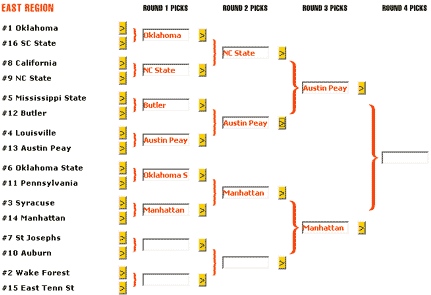
Method: JavaScript, via buttons. Users click the yellow button next to a team to designate it as a winner. All four regions (East, South, Midwest, West) are on the same page, in separate brackets.
Comments: The yellow buttons are a bit small (and thus difficult to click). Plus, they all look the same; it's easy to mistake one for another, especially in the crammed-for-space first round. And users without JavaScript cannot use it (and aren't even notified of their browser's shortcomings via a noscript message). Otherwise, it's nice and clean.
SI.com
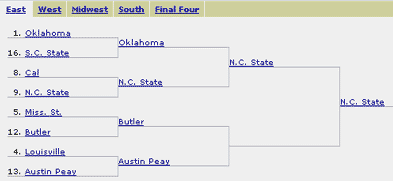
Method: JavaScript, via links. Users click the team name itself (which is a blue, underlined link) to designate it as a winner. The four regions are split across several DHTML layers on the same page, accessed via a horizontal navbar.
Comments: Beautifully simple -- once I understood I was supposed to click the team names in order to choose them as winners. (This works against the Web convention that clicking on a link gives you more information about it.) Doesn't provide a way for non-JavaScript-enabled users to submit their picks, though.
Yahoo! Sports
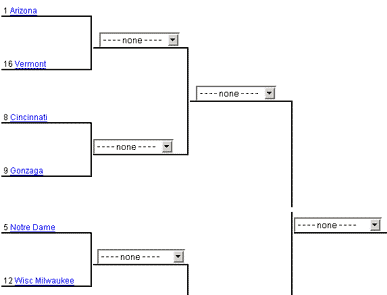
Method: HTML drop-down select boxes. Users choose the team that sits in a particular slot on the bracket (a subtle difference from the previous two examples). The four regions are split across four pages.
Comments: A clear advantage here is users' ability to work backwards. (Some people like to fill out their brackets this way.) Plus, users with JavaScript disabled can still use it, and hitting the Back button after a submission won't erase all your picks. (JavaScript will.) The tradeoff: Selecting each pick via a drop-down box is significantly more laborious than the point-and-click of the previous two examples.
ESPN: Flash version
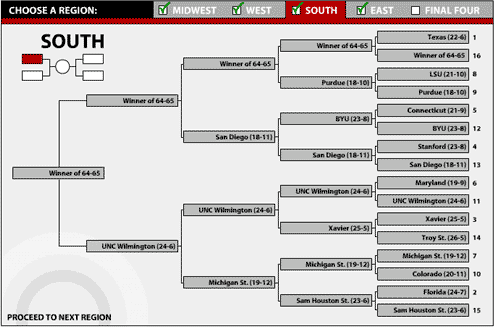
Method: Flash. Users can either click on a team to advance it, or drag a team as far as they think it should advance. The four regions appear on four different areas of the screen in the same Flash interface.
Comments: Beautifully done and a joy to use -- if you have Flash. The drag-a-team feature is brilliant; it meets the needs of backward-users and forward-users. The clicking of team names is straightforward and didn't make me double-take (as SI.com's blue underlined links did).
ESPN: HTML version
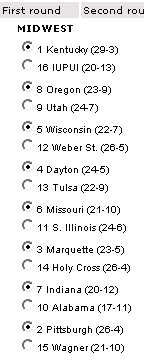
Method: HTML radio buttons. All four regions are on the same page; each round gets a separate page.
Comments: Those radio buttons are awfully hard to pinpoint with a mouse cursor. This'd be a good deal easier if the team names were marked up with the label tag, which extends the clickable area of the form element to include the text. But the usual advantages of standard Web forms apply: It works for all users, and the choices stick around after a click of the Back button.
Final comment: My own bracket
This weekend, I put together an interactive bracket selector, similar to the above brackets, for our KUSports.com 2003 NCAA Tournament Contest. It uses JavaScript with buttons, with a noscript message for users without JavaScript. The cool thing about it: Users get a customized PDF file of their bracket as soon as they submit it. (I used PHP's PDF libraries to do so.) As far as I can tell, we're the only site that offers this feature.
Comments
Posted by Gary Love on March 17, 2003, at 9:19 p.m.:
ESPN's flash version of their bracket also has the ability to print out your final bracket. I'm not sure what they're using to generate it, but it looks slick.
Posted by Adrian on March 17, 2003, at 9:52 p.m.:
You're right, Gary. I just submitted an ESPN bracket, and the Flash version offers a "print complete bracket" option. It's not PDF; it appears to be entirely Flash-based.
Posted by Doug on March 19, 2003, at 2:50 p.m.:
What do you think of the version at nytimes.collegebasketball.upickem.net? It is unique in that you pick each game of the tournament as it goes along.
Posted by webspiffy on March 19, 2003, at 7:35 p.m.:
Yeah ESPN's interface is definitely my favorite of the bunch.
Posted by michael on March 19, 2003, at 11:36 p.m.:
It seems like it would be much less exciting to pick before each game. The one thing none of these have is a way to get information on the teams and games (like you would expect on the SI one).
Posted by Sean Polay on March 19, 2003, at 11:49 p.m.:
I sampled all of these brackets and a few others before reading Adrian's analysis. He's right-on. The Yahoo! implementation was my least favorite, largely because it did not allow the user to jump among regions in midstream. The user has to complete a region for those picks to be saved so the user can move onto the next. The javascript and Flash implementations allowed the user more usability options. How often do you read that about javascript or Flash??!!
Posted by Julie on March 20, 2003, at 1:38 a.m.:
I can't actually use the ESPN version -- I signed up for something on their site YEARS ago saying I was under 13 to avoid spam and every time I've been back since the links to modify account information are all broken. At any rate, the one thing I really like about it based on your handy screen shot is the tiny "map" that shows you which part of the bracket you're working in. Even though I can see all the teams I need to see at the given moment, I tend to feel a little lost in the other versions. I like the visual representation. That said, I also want the brackets to face the "correct" direction as determined by the official NCAA bracket. (Midwest and West going from 16-to-1 and South and East going from 1-to-16)
Posted by uscsoccerdude on March 20, 2003, at 2:16 a.m.:
msnbc has a good bracket.wait...amazing bracket
Posted by anonymous on March 20, 2003, at 5:02 p.m.:
Yahoo also lets you print out a bracket once you've filled it out. Also, Yahoo has a very cool feature (once the tourny starts) that will predict the outcome of your pool given the outcomes of different games. So you can tell it, ok, if Duke wins and Flordia looses who's in first place, etc. Really neat.
Posted by LWood on January 30, 2004, at 5:57 p.m.:
Any chance you're putting together a bracket for 2004?
Posted by Up North Michigan on March 19, 2005, at 6:54 p.m.:
Adrian: You have a great future ahead of you. Your bracket review is one of those great sites that one wishes for but doesn't think actually exists. Then I found it and easily too; google "NCAA brackets". Thank You.
Posted by DB on October 18, 2005, at 10:28 p.m.:
I really appreciate your round-up of major sports site brackets. I happen to work for a major sports news website and am trying to get ideas to update our bracketing system. I'll be sure to let you know when it's ready for review.
Posted by Dirk on March 15, 2006, at 5:21 a.m.:
winning